
Download FASHN Virtual Try On – AI‑Powered Fashion Design Tool
Introduction & Overview
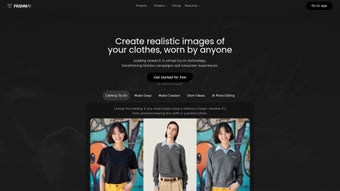
FASHN Virtual Try‑On is a cutting‑edge web application that brings the fitting room to the digital studio. Powered by advanced artificial intelligence, the platform lets designers, retailers, and fashion enthusiasts swap garments on model photographs with a simple upload of a reference image. The result is a real‑time, photorealistic preview of how a piece of clothing will drape, stretch, and sit on a chosen body type.
By eliminating the need for physical samples, FASHN accelerates the design workflow, reduces material waste, and shortens the time‑to‑market for new collections. The service operates on a subscription model, offering tiered plans that cater to freelancers, boutique houses, and large enterprises alike. Its intuitive interface, combined with a robust AI engine, makes it a valuable asset for anyone looking to visualize fashion concepts quickly, securely, and at scale.
Whether you are a seasoned designer seeking rapid prototyping or a retailer wanting to showcase multiple styling options online, FASHN Virtual Try‑On provides a practical, secure, and future‑ready solution for modern fashion creation.
The platform’s core advantage lies in its ability to generate high‑fidelity visualizations without the overhead of manual Photoshop compositing. Users simply select a model image, drag a garment file onto the canvas, and watch the AI instantly adapt the clothing to the model’s pose, lighting, and body proportions. This seamless experience dramatically cuts down on iteration time, allowing teams to test dozens of colorways, patterns, and silhouettes in a single afternoon. Moreover, because every process runs in the cloud, designers benefit from automatic updates, enterprise‑grade security, and the freedom to work from any device with an internet connection. In short, FASHN Virtual Try‑On is not just a novelty—it is a productivity‑enhancing, sustainability‑focused tool that aligns with the fast‑paced demands of today’s fashion industry.
Key Features & Installation Guide
- AI‑driven garment overlay that adapts to model pose and body shape.
- Support for multiple image formats (JPEG, PNG, WebP) and high‑resolution outputs.
- One‑click background removal and automatic color matching.
- Real‑time adjustment sliders for fit, stretch, and fabric flow.
- Batch processing for bulk uploads, ideal for catalog creation.
- Secure cloud storage with GDPR‑compliant data handling.
- Integrations with popular design tools such as Adobe Photoshop and Illustrator.
- Multi‑user collaboration workspace with role‑based permissions.
- Regular updates that incorporate the latest AI models and fashion trends.
- 24/7 customer support and a comprehensive knowledge base.
Step‑by‑Step Installation & First Use
Getting started with FASHN Virtual Try‑On is straightforward, even for users with limited technical background. Follow these steps to install and launch the application:
- Create an account: Visit the official website, click “Sign Up,” and provide your email address. A verification link will be sent to confirm your identity.
- Select a subscription plan: Choose between the “Starter,” “Professional,” or “Enterprise” tiers based on your expected usage and feature needs. All plans offer a 14‑day free trial.
- Access the web portal: After logging in, you will be directed to the dashboard. No additional software download is required because the platform runs entirely in the browser, ensuring cross‑platform compatibility.
- Upload a model photo: Click the “Upload Model” button, select a high‑resolution image of your chosen model, and let the AI automatically detect key body landmarks.
- Choose a clothing reference: Drag and drop a garment image (e.g., a dress, jacket, or pair of pants). The system will instantly generate a realistic overlay.
- Fine‑tune the fit: Use the sliders for “Stretch,” “Wrap,” and “Layer Opacity” to adjust how the garment drapes. The AI recalculates in real time, providing an almost photographic result.
- Save or export: Once satisfied, click “Export.” You can download the composite image in PNG or JPG format, or save it directly to your cloud workspace for team collaboration.
- Iterate: Repeat the process with different models or garments to compare styles, colors, and fits without producing any physical samples.
Because the application is web‑based, you benefit from automatic updates; the latest AI improvements and security patches are applied server‑side, eliminating the need for manual upgrades. This ensures that your design workflow remains both current and secure. For power users who prefer a desktop‑like experience, an optional Electron wrapper is available for Windows and macOS, delivering native performance while retaining the same cloud‑synchronised features.
Compatibility, Pros & Cons
FASHN Virtual Try‑On is built as a responsive web app, meaning it works seamlessly on any modern browser across Windows, macOS, Linux, Android, and iOS devices. The platform supports Chrome, Firefox, Safari, and Edge, with no additional plugins required. For teams that prefer a dedicated desktop experience, the service also offers a lightweight Electron wrapper for Windows and macOS, providing native‑like performance while retaining the same cloud‑based features. System requirements are modest: a recent processor, at least 4 GB of RAM, and a stable broadband connection (minimum 5 Mbps download) ensure smooth real‑time rendering.
Pros
- Instant visual feedback thanks to powerful AI processing.
- Eliminates the cost and time associated with physical samples.
- Highly intuitive interface; minimal learning curve.
- Secure, GDPR‑compliant cloud storage protects proprietary designs.
- Scalable subscription model accommodates freelancers to large enterprises.
- Regular feature updates keep the tool aligned with industry trends.
- Cross‑platform accessibility via web browser and optional desktop client.
- Robust API and plug‑ins for seamless integration with existing design pipelines.
- Batch processing speeds up catalog creation for e‑commerce teams.
- 24/7 support and an extensive knowledge base reduce downtime.
Cons
- Requires a stable internet connection for optimal performance.
- Subscription pricing may be prohibitive for hobbyists on a tight budget.
- Advanced AI adjustments (e.g., fabric texture simulation) are limited to higher‑tier plans.
- Current version does not support 3D model integration, which some high‑end studios may require.
- Large file uploads can be slowed by bandwidth constraints on slower networks.
- Limited offline capabilities; the desktop wrapper still depends on cloud services.
Frequently Asked Questions
Is there a free trial available for FASHN Virtual Try‑On?
Yes, a 14‑day free trial is offered for all subscription tiers. You can explore every feature without providing payment details, and upgrade or cancel at any time during the trial period.
Can I use the tool on a mobile device?
Absolutely. The responsive design works on both Android and iOS browsers, allowing you to upload images, adjust garments, and export results directly from your smartphone or tablet.
How secure is my proprietary design data?
FASHN employs end‑to‑end encryption, regular security audits, and complies with GDPR and CCPA standards. All uploaded images and generated composites are stored in encrypted cloud containers with strict access controls.
What file formats can I import and export?
You can import JPEG, PNG, and WebP files up to 25 MB each. Export options include high‑resolution PNG and JPG, as well as a lossless SVG for vector‑based workflows.
Does the platform integrate with existing design software?
Yes. FASHN offers plug‑ins for Adobe Photoshop and Illustrator, as well as an API that lets you embed the virtual try‑on functionality directly into custom e‑commerce platforms or internal design pipelines.
Conclusion & Call to Action
FASHN Virtual Try‑On sets a new benchmark for AI‑driven fashion visualization. By turning a simple image upload into a lifelike garment simulation, it empowers designers to iterate faster, reduce waste, and present polished concepts to clients without ever cutting fabric. The platform’s browser‑based architecture ensures that you can work from any device, while the subscription model offers flexibility for both solo creators and large teams. Although a stable internet connection and a subscription cost are considerations, the productivity gains and sustainability benefits far outweigh these minor drawbacks. If you’re ready to modernize your design workflow, boost client presentations, and stay ahead of the fast‑moving fashion market, now is the perfect moment to download FASHN Virtual Try‑On and start your free trial.
Overall Rating: 4.6 / 5
Pros: Real‑time AI overlay, cloud security, cross‑platform access.
Cons: Requires internet, higher‑tier pricing for advanced features.
Take the next step—sign up today, explore the free trial, and experience how AI can transform your fashion design process.



.png)



